
Project:OS
Major projects all run on the same underlying structure of phases, workflows, roles, duties, gates and decisions, and Project:OS holds it as one architecture, the full delivery lifecycle from strategic intent to close-out, with each part linked to the parts it depends on. A team configures it to its project, and the register, schedule and assurance view are generated from it.
Why Project:OS exists
The pattern is about where the method is kept, rather than the competence of the people keeping it.
A person per project
- The process lives in someone's head
- It is rebuilt from scratch on each project
- The organisation chart stands in for the workflow
- Knowledge leaves when people do
A system per organisation
- The repeatable 80% is written down once
- Each project inherits it and configures the rest
- Work flows through the system
- Lessons flow back into the system
The result Most projects start from zero, and the client pays to rebuild what it already knew. We set out the argument in People as Proxies for Systems.
How the architecture is organised
Start at the lifecycle and follow any phase down through to the activities, decisions and rules inside it.
Project:OS describes delivery as a connected model. In data terms it is an ontology: a defined set of things, such as phases, workflows, activities, roles, duties, gates, artefacts and risks, and the relationships between them. Because the links are explicit, a change to one part shows everything it touches.
The lifecycle
Eight phases from strategic intent to close-out form the baseline for any type of project. The frameworks teams already use map onto it, so nobody has to give up their own stage names.
The workflows
23 workflows run through the eight phases, with 262 activities in all. Each cell shows how many of a workflow's activities are active in that phase, so you can see where the work concentrates and where it hands on.
Inside one workflow
Open W16, Planning and Statutory Consents, and each of its 14 activities carries the decision points, artefacts, risks, roles, handoffs and rules that belong to it.
14 activities, from strategy to lessons learned
- W16.1Consenting strategy and route selection
- W16.2Environmental impact assessment coordination
- W16.10Pre-application consultation
- W16.12Habitats Regulations assessment
- W16.13Marine licensing
- W16.11Land rights and compulsory acquisition
- W16.3Application and submission management
- W16.4Examination and determination support
- W16.5Consent conditions and requirements
- W16.14Planning obligations and highways agreements
- W16.6Secondary consents and permits
- W16.7Consent compliance monitoring
- W16.8Consenting reporting and governance
- W16.9Consenting learning and precedent capture
Linked to the activities in the model
What it generates. The register of work, the schedule, the assurance view and the knowledge base are generated from this architecture, so they stay consistent with each other. They are shown below.
What it generates
Each of the screens below draws on the same underlying method, so a change made in one place appears everywhere that it matters.
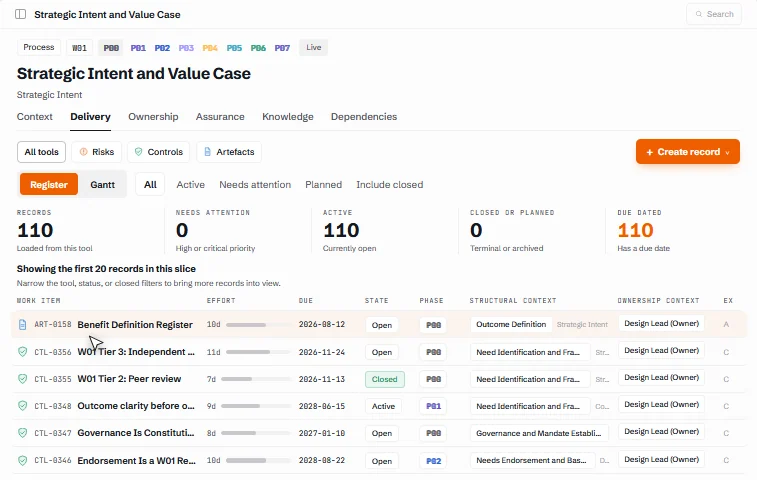
The delivery register
One register holds every record in the selected slice of the project. Filter by tool, status or phase, then open any row and edit it in place. In the workflow shown, all 110 records were generated from a single workflow rather than entered by hand.
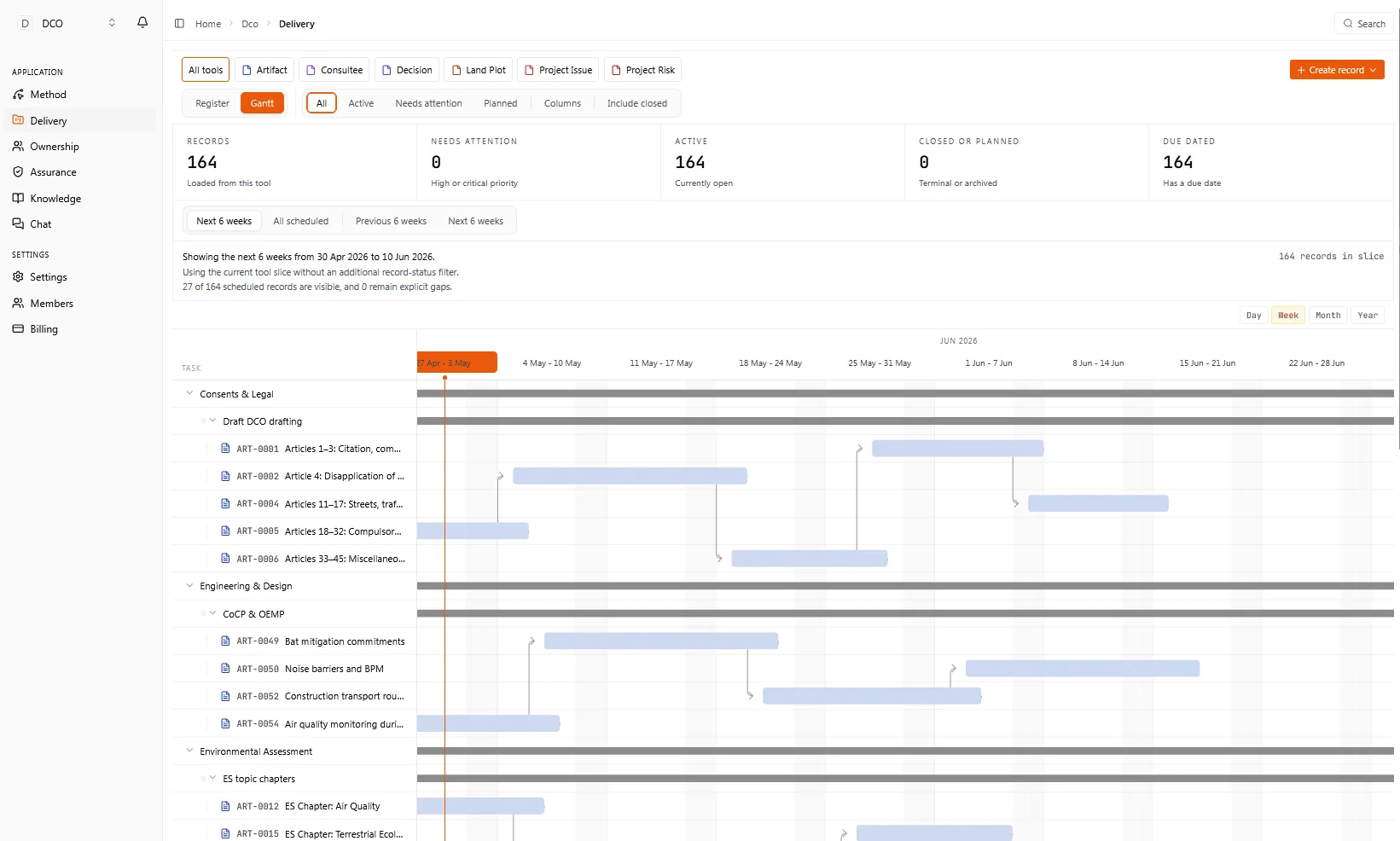
The schedule
The schedule comes from the method. Cost plans, commitment registers and contingency allocations arrive in sequence, with their dependencies already in place, and can be viewed by day, week, month or year.
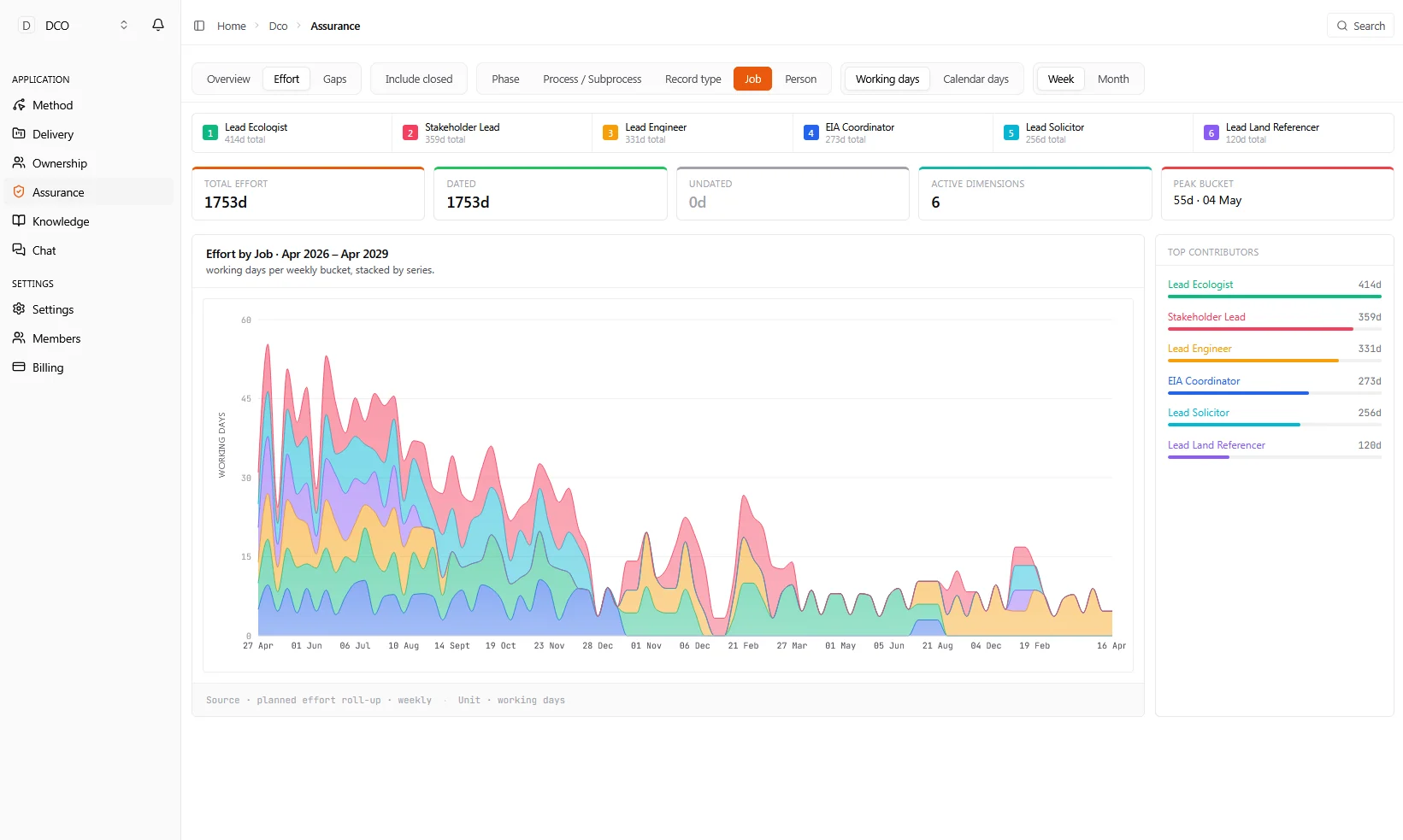
The assurance view
Overdue, threatened and due-soon items are brought forward automatically, and gaps in effort and coverage show up by phase and by role. Assurance becomes part of the working record.
A knowledge base for each workflow
Each workflow has its own reference pages covering purpose, governance domains, sub-processes and assurance tiers. They are versioned with the project, so the method stays with the work.
What Project:OS holds from day one
Before a team adds anything of its own, Project:OS already contains a full delivery lifecycle, with the people, duties and gates linked together.
- Phases
- 8, from strategic intent to operational transition and close-out
- Workflows
- 23
- Sub-processes
- 262
- Roles
- 111
- RACI links
- 1,461
- Statutory-duty links
- 540
- Gate links
- 704
- Sign-off links
- 590
- Artefact templates
- 215
- Contract forms mapped
- 79
- Building blocks
- About 6,800
Roles, duties and gates
The 111 roles are linked to the work through RACI links and to legislation through statutory-duty links, so each duty has a named owner from day one. The roles include duty-holders such as the Principal Accountable Person under the Building Safety Act, nuclear site licence holders and COMAH operators. Gates and sign-offs are linked in the same way.
Any form of contract
Project:OS maps 79 contract forms, including the full NEC4 family, JCT, eight FIDIC books, IChemE, PPC2000 and FAC-1/TAC-1. Whichever form a project uses, the duties and sign-offs it creates are assigned to the people who hold them. The contract and the governance remain the client's own.
Artefact templates
Each of the 215 artefact templates carries a named owner, the resource inputs needed to produce it and its logic: what it depends on and what depends on it. It also carries a quality criteria checklist, a maturity state showing how firm the information is, an assumptions register and an approval pathway. Each deliverable is reviewed against the same criteria, by the people responsible for it.
What is available now
We are careful to distinguish what the product does today from what we are still developing, so that nobody relies on a capability that is not yet there.
| Capability | Status |
|---|---|
| Delivery register: each work item, filterable and editable in place | Available |
| Schedule generated from the method, with dependencies in place | Available |
| Assurance view: overdue, threatened and due-soon items; effort and coverage by phase and role | Available |
| Knowledge base for each workflow, versioned with the project | Available |
| Delivery lifecycle library: phases, workflows, sub-processes, roles, RACI, statutory duties, gates and sign-offs | Available |
| Artefact templates with owner, resource inputs, logic, quality criteria, maturity state, assumptions register and approval pathway | Available |
| Assurance tiers and endorsement points, such as peer review and independent assurance, defined in the method and carried out by people | Available |
| Contractual mappings: duties and sign-offs mapped across 79 contract forms | Available |
| AI agents that gather information and prepare drafts, with a person checking the output and making the decision | Available |
| Automatic checking of deliverables against their quality criteria | In development |
Questions
What does Project:OS hold before we add anything of our own?
The full delivery lifecycle: 8 phases, 23 workflows and 262 sub-processes. Behind it sit 111 roles, connected to the work by 1,461 RACI links and to legislation by 540 statutory-duty links, so each duty has a named owner from the start. Gates are covered by 704 gate links and 590 sign-off links.
Does it work with our form of contract?
Project:OS is contract-neutral. It maps 79 contract forms, including the full NEC4 family, JCT, eight FIDIC books, IChemE, PPC2000 and FAC-1/TAC-1. Whichever form you use, the duties and sign-offs it creates are mapped to the people who hold them.
Are deliverables checked automatically?
Not yet. Each of the 215 artefact templates carries an owner, resource inputs and logic, as well as a quality criteria checklist, a maturity state, an assumptions register and an approval pathway, so each deliverable is reviewed against the same criteria by the people responsible for it. Automatic checking against those criteria is in development.
Where does AI come in?
Three kinds of agent work inside Project:OS, each with a defined job.
- Micro-agents work at the level of a single task: they gather information, prepare drafts and measure progress against the method.
- Domain agents work within a discipline, such as cost, schedule or risk, to simulate, forecast and compare options.
- An orchestrator agent watches the programme as a whole, brings the other agents' outputs together and flags where attention is needed.
None of them makes a decision. Agents prompt and escalate; a person checks each output against the record before anyone relies on it, and a named person makes the call with the evidence in front of them.
Do we need Project:OS to work with Synaform?
No. Project:OS is available on its own, and our advisory and modelling work does not depend on it. Where it would help, we will say why; where your existing tools serve the purpose, we will work with those.
How does Project:OS relate to Playground?
They address different questions. Project:OS sets out how the work should run: the roles, duties, gates and sign-offs. Playground, which is still in development, is intended to show what is actually happening. It assembles the data, including by connecting to the systems you already run, and brings out insight into what has happened and why, with earlier warning of what may be coming.
Ask for a demonstration
We can walk through the register, schedule, assurance view and knowledge base, and discuss how the method would apply to your project and form of contract.
Request a demonstration