
Playground
Playground is the working environment behind our services. It is where we connect the information a question needs, model how an operation actually works, simulate the options and build the tools that carry a decision into practice, and the aim for clients is one model of your business, programme or projects that your team can question, test and act on, with each decision on the record.
What Playground is for
The information a decision needs usually exists already, sitting in finance, resourcing, schedules, contracts and documents, in systems that were never designed to talk to each other.
Playground is designed to connect to those systems where they are and join what they hold into one model of the things an organisation manages: customers, people, money, assets and projects, and how each one relates to the rest. Where a dashboard reports a number, Playground is meant to hold the things behind the number, so that a question can be followed through to everything it touches.
Construction records often disagree. Where they do, the model is designed to hold the competing figures side by side and record which one was relied on, by whom and why.
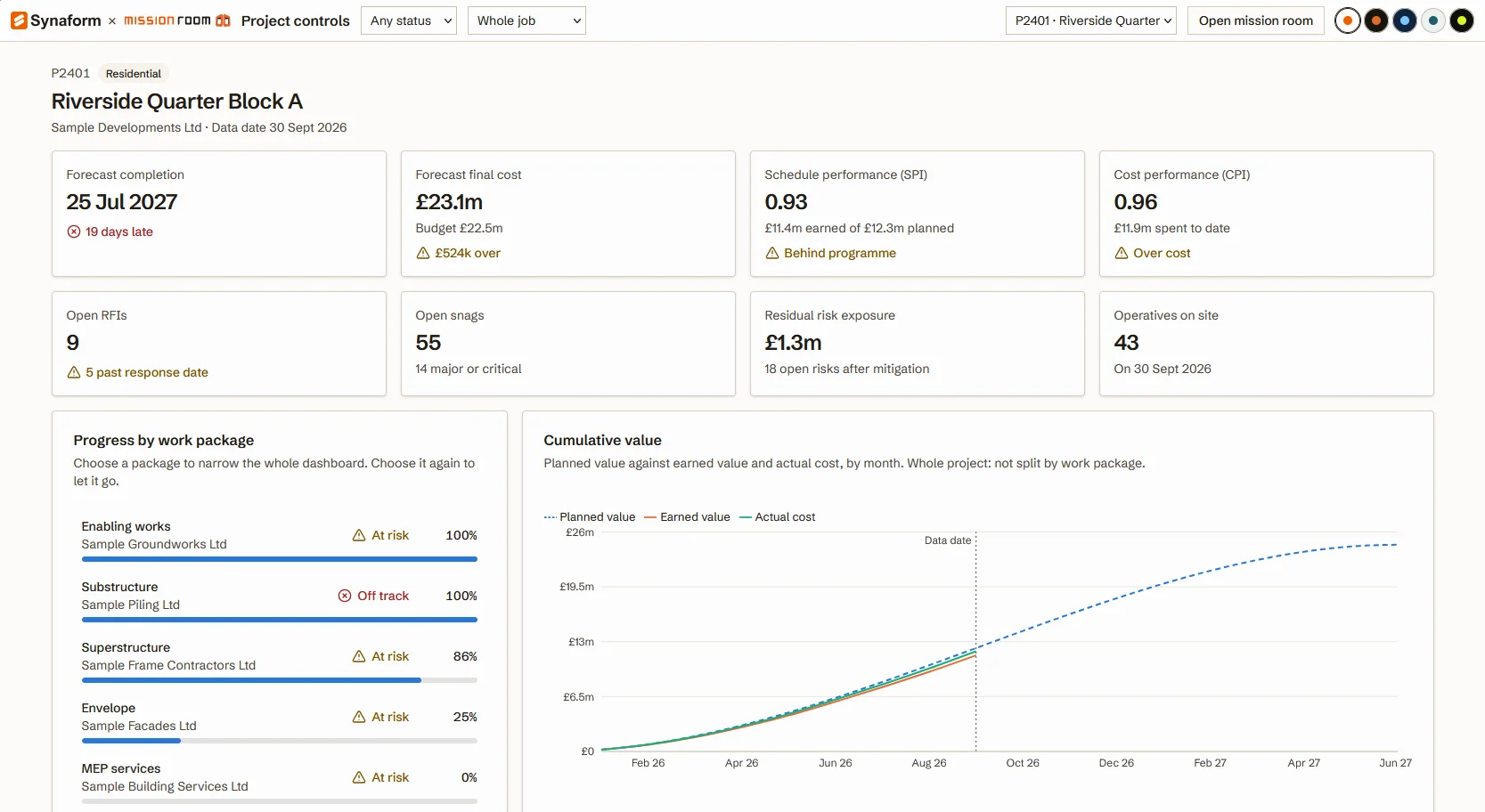
An example: a critical delivery is six weeks late
An illustrative example of what a client team could do, and see, in Playground once its systems have been connected.
One model of the things you manage
Illustrative scenario- Finance
- Programme
- Cost
- Common data environments
- GIS and digital twin platforms
- Site and plant
- Materials and carbon
- Weather
- Land and planning
- Applications and workflows
- Analysis: what happened and why
- Decisions on the record
- Earlier warning of emerging issues
- See the reachThe late delivery appears on the model, linked to the work packages it holds up, the people booked to them, the cash forecast and the customers waiting on handover. Nobody has to assemble a spreadsheet to find out.
- Test the optionsAdd a second shift, resequence the work or accept the delay. Each response is modelled side by side against completion, cost, cash and the commitments already made, with its assumptions shown.
- Decide on the recordThe team chooses, and the decision is recorded once with who made it, why and the evidence it rested on. Each view now draws on the same answer.
- Learn from itAs the work proceeds, the record shows what happened against what was expected, so the next forecast starts from evidence.
Four levels of analysis, on the same model
In development- Level 1 · DescriptiveWhat happened?The delivery is six weeks late, and the packages, people and payments linked to it are visible.See the reach
- Level 2 · DiagnosticWhy did it happen?The record shows where the delay started and what it was waiting on.See the reach
- Level 3 · PredictiveWhat is likely to happen?Each response is projected forward on completion, cost and cash, with its uncertainty shown.Test the options
- Level 4 · PrescriptiveWhat should we do?The option that best meets the team's objectives is set out, for a named person to decide.Decide on the record
Playground supports our work across all five services
The same model and the same proven parts serve every kind of question we are asked to help with.
- Strategic and operational advisoryOptions compared against one record of the organisation, so advice rests on how things are actually connected and not on a figure assembled for the meeting.
- Systems modelling and simulationModels built on the real relationships between work, people, money and assets, and run before a change is made.
- Technology and AI enablementNew tools and AI applications built over the same model and under the same permissions, so their answers can be traced back to the record.
- Process and organisational improvementA view of how work flows between teams and systems, which shows where the constraints sit and whether a change has moved them.
- Data, integration and implementationConnections to the systems you already run, with the data left where it is held, and tools assembled from proven parts.
How it is meant to work
Playground's own flow, from connected information to recorded decisions.
- 01ConnectLink to the systems teams already run. The data stays where it is held.
- 02ModelJoin what those systems hold into one model of the things you manage, and how each relates to the rest.
- 03DecideMake each decision against the model and record it once, with who made it and why.
- 04ActBuild the applications and workflows that carry the decision out, on the same shared model.
Underneath all four Permissions and a full audit trail held on the model itself, so each view draws on the same record and each change shows who made it and when.
Where Playground is today
- Used by our team to build tools and models from shared parts
- Demonstrations with sample data
- Connections to common platforms
- The connected model
- Scenario testing
- Decisions on the record
- Permissions and audit trail
- Analysis on the model
Questions
Will we have to move our data into Playground?
No. Playground is designed to connect to the systems you already run, from finance and resourcing to schedules, contracts and documents. Your data stays where it is, and the model joins up what those systems hold without replacing the tools your teams rely on.
How is this different from a dashboard?
A dashboard reports a number, whereas Playground is designed to hold the things behind it, such as people, money, assets and projects, and how each one relates to the rest. That makes it possible to follow a late delivery through to the work it affects, the people on it, the cash forecast and the commitments made to customers before deciding what to do.
Who can see and change what?
Permissions and the audit trail are designed to sit on the model itself, not in each separate application. Each view draws on the same record, and each change shows who made it and when.
When will Playground be available?
Playground is still in development. If you would like to see it with sample data, or to be told when it becomes available, get in touch.
See Playground with sample data
Tell us about the question, application or workflow you have in mind. We can show Playground with sample data and keep you informed as capabilities become available.
Request a demonstration